Source Link: https://help.lob.com/developer-docs/api-quickstart-guide
--- description: Jump in and explore our APIs --- # API quickstart guide {% embed url="https://lob.wistia.com/medias/3rty603uh7" %} Overview of sending mail with Lob's APIs {% endembed %} **The following quickstart guide allows you to jump in and explore the** [**Lob Print & Mail API**](https://docs.lob.com) **in your preferred programming language.** ## Lob account basics In order to follow this Quickstart guide, you will need: * A Lob account; create your account [here](https://dashboard.lob.com/register). * Your [API keys](../account-management/api-keys) (you can find these in your Dashboard under Settings → API Keys) ## Language setup guides These brief sections are aimed at developers who are less familiar with the languages with which they will be working with Lob API. Currently, Lob provides client libraries in the following languages: \ (Note: If you are a TypeScript user, you can jump right in with a video tutorial: [Sending a postcard with Typescript](https://www.youtube.com/watch?v=norpZBsMHJE).) {% tabs %} {% tab title="TypeScript (NodeJS)" %} Follow the instructions on the [TypeScript download page](https://www.typescriptlang.org/download). For Windows, installing through the Visual Studio text editor is the best option. Follow the download and setup instructions on [the official Node.js website](https://nodejs.org/en/download/). To make switching between Node versions easy, install **nvm** on your local machine, following [the instructions](https://github.com/nvm-sh/nvm) in the official Node Version Manager GitHub repository. To get the latest LTS release, run: ```json // nvm install --lts ``` Alternatively, Windows users should install the [latest release](https://github.com/coreybutler/nvm-windows/releases) of nvm-windows by following [the instructions](https://github.com/coreybutler/nvm-windows) in its home repository. {% endtab %} {% tab title="Python" %} Download and set up the appropriate version from [Python’s official website](https://www.python.org/downloads/). {% endtab %} {% tab title="Ruby" %} #### Mac Run `ruby -v` to check whether it’s pre-installed. If not, run `brew install ruby` (make sure to [install Homebrew](https://brew.sh/) first if you haven’t already). Add the path for your version of Ruby to your environment’s `PATH` variable. #### Windows Download the appropriate version from [Ruby’s official downloads page](https://rubyinstaller.org/downloads/). {% endtab %} {% tab title="PHP" %} #### Mac Run`php -v`to check whether it’s pre-installed. If not, run`brew install php`(make sure to [install Homebrew](https://brew.sh/) first if you haven’t already). Add the path for your version of PHP to your environment’s **PATH** variable. [\ ](https://www.php.net/downloads.php) #### Windows Download the appropriate version from [PHP's official downloads page.](https://www.php.net/downloads.php) {% endtab %} {% tab title="Java" %} Download either the Arm 64 or x64 DMG Installer from [Java’s official downloads page](https://www.oracle.com/java/technologies/downloads/#jdk17-mac). {% endtab %} {% tab title="C#/.NET" %} Download from [Microsoft's official website](https://dotnet.microsoft.com/en-us/download). {% endtab %} {% endtabs %} ## Installing Lob’s API client This Quickstart guide provides a code example of one of Lob’s core services: creating a postcard through our Print & Mail API. **Make sure you are in the correct directory** before running the code samples (creating one for the purpose of running these is advised, but not required). Create a new directory and switch to it from your terminal app with these commands. `mkdir lob-qs` `cd lob-qs` The next step is to install the version of Lob API which matches the language you are working in: {% tabs %} {% tab title="Typescript" %} Install Lob's TypeScript SDK `npm install @lob/lob-typescript-sdk`\ {% endtab %} {% tab title="Python" %} Create a new virtual environment `python3 -m venv venv` Activate the environment `source venv/bin/activate` Install lob python from pypi `pip install lob_python` {% endtab %} {% tab title="Ruby" %} `gem install lob` {% endtab %} {% tab title="PHP" %} ```php curl -sS https://getcomposer.org/installer | php php composer.phar require lob/lob-php php composer.phar install ``` {% endtab %} {% tab title="Java" %} In this guide, we will be using [Maven](https://maven.apache.org/). From the command line, create a new maven project. ```java mvn archetype:generate -DgroupId=com.company.app -DartifactId=my-app -DarchetypeArtifactId=maven-archetype-quickstart -DarchetypeVersion=1.4 -DinteractiveMode=false ``` Edit the **pom.xml** file in the _my-app_ folder to include this bit of code: ```java com.lob lob-java 13.0.0 ... ``` In the **pom.xml** file update the source and target to 1.8 ```java 1.8 1.8 ``` {% endtab %} {% tab title="C#/.NET" %} Create a new C# project `dotnet new console` Install Lob's .NET SDK `dotnet add package lob.dotnet` {% endtab %} {% endtabs %} ## Creating a Postcard via API Now that a Lob API wrapper has been installed on your local machine, we can begin by sending a request to the API with the data necessary for postcard creation. Open the text editor of your choice (if you need to download one, we recommend Visual Studio Code) and paste the code in the language of your choice: (As a note, if the address in question has a suite or apartment number, you can add in a data point for it as such: -d "to\[address\_line2]=\") {% tabs %} {% tab title="TypeScript" %} In your working directory: * Create a new file _app.ts_ * Copy and paste the code below into _app.ts_ * Replace _\_ with your Lob Test API Key in the code. ```typescript import {Configuration, Postcard, PostcardsApi, PostcardEditable, AddressEditable } from "@lob/lob-typescript-sdk" async function demo() { const config: Configuration = new Configuration({ username: "" }) const postcardData : PostcardEditable = new PostcardEditable({ to: new AddressEditable({ name: "Harry Zhang", address_line1: "210 King Street", address_city: "San Francisco", address_state: "CA", address_zip: "94107" }), from: new AddressEditable({ name: "Leore Avidar", address_line1: "210 King Street", address_city: "San Francisco", address_state: "CA", address_zip: "94107" }), front: "https://s3-us-west-2.amazonaws.com/public.lob.com/assets/templates/4x6_pc_template.pdf", back: "https://s3-us-west-2.amazonaws.com/public.lob.com/assets/templates/4x6_pc_template.pdf" }) try { const result : Postcard = await new PostcardsApi(config).create(postcardData) return result } catch (err: any) { console.error(err) } } demo().then((result)=> console.log(result)).catch() ``` In your typescript project folder: Compile your code `tsc app.ts` \ Run your app: `node app.js` {% endtab %} {% tab title="Python" %} In your working directory: * Create a new file app.py * Copy and paste the code below into app.py * Replace _\_ with your Lob Test API Key in the code. ```python import lob_python from lob_python.exceptions import ApiException from lob_python.model.postcard_editable import PostcardEditable from lob_python.model.address_editable import AddressEditable from lob_python.model.merge_variables import MergeVariables from lob_python.model.country_extended import CountryExtended from lob_python.api.postcards_api import PostcardsApi configuration = lob_python.Configuration( username = "" ) postcard_editable = PostcardEditable( description = "First Postcard", front = "Front HTML for {{name}}", back = "Back HTML for {{name}}", to = AddressEditable( name = "Harry Zhang", address_line1 = "210 King Street", address_city = "San Francisco", address_state = "CA", address_zip = "94107", ), _from = AddressEditable( name = "Leore Avidar", address_line1 = "210 King Street", address_city = "San Francisco", address_state = "CA", address_zip = "94107", address_country = CountryExtended("US") ), merge_variables = MergeVariables( name = "Harry", ), ) with lob_python.ApiClient(configuration) as api_client: api = PostcardsApi(api_client) try: created_postcard = api.create(postcard_editable) print(created_postcard) except ApiException as e: print(e) ``` In your working directory: Run your app: `python app.py` {% endtab %} {% tab title="Ruby" %} In your working directory: * Create a new file _app.rb_ * Copy and paste the code below into _app.rb_ * Replace _\_ with your Lob Test API Key in the code. ```ruby require 'lob.rb' require 'pp' lob = Lob::Client.new(api_key: "") pp lob.postcards.create( description: "First Postcard", to: { name: "Harry Zhang", address_line1: "210 King Street", address_city: "San Francisco", address_state: "CA", address_zip: "94107" }, from: { name: "Leore Avidar", address_line1: "210 King Street", address_city: "San Francisco", address_state: "CA", address_zip: "94107" }, merge_variables: { name: "Harry" }, front: "Front HTML for {{name}}", back: "Back HTML for {{name}}" ) ``` In your working directory: Run your app: `ruby app.rb` {% endtab %} {% tab title="PHP" %} In your working directory: * Create a new file _app.php_ * Copy and paste the code below into _app.php_ * Replace _\_ with your Lob Test API Key in the code. ```php postcards()->create(array( "description" => "First Postcard", "to[name]" => "HARRY ZHANG", "to[address_line1]" => "210 KING STREET", "to[address_city]" => "SAN FRANCISCO", "to[address_state]" => "CA", "to[address_zip]" => "94107", "from[name]" => "LEORE AVIDAR", "from[address_line1]" => "210 KING STREET", "from[address_city]" => "SAN FRANCISCO", "from[address_state]" => "CA", "from[address_zip]" => "94107", "front" => "Front HTML for {{name}}", "back" => "Back HTML for {{name}}", "merge_variables[name]" => "Harry" )); print_r($postcard); ?> ``` In your working directory: Run your app: `php app.php` {% endtab %} {% tab title="Java" %} In your new maven project: * Locate the App.java file in main/java/com/company/app * Copy and paste the code below into A_pp.java_ * Replace _\_ with your Lob Test API Key in the code. ```java package com.company.app; import com.lob.api.ApiClient; import com.lob.api.ApiException; import com.lob.api.Configuration; import com.lob.api.auth.*; import com.lob.model.*; import com.lob.api.client.PostcardsApi; public class App { public static void main( String[] args ) { ApiClient lobClient = Configuration.getDefaultApiClient(); // Configure HTTP basic authorization: basicAuth HttpBasicAuth basicAuth = (HttpBasicAuth) lobClient.getAuthentication("basicAuth"); basicAuth.setUsername(""); PostcardsApi apiInstance = new PostcardsApi(lobClient); PostcardEditable postcardEditable = new PostcardEditable(); AddressEditable to = new AddressEditable(); to.setName("MORTICIA ADDAMS"); to.setAddressLine1("1313 CEMETERY LN"); to.setAddressCity("WESTFIELD"); to.setAddressState("NJ"); to.setAddressZip("07091"); AddressEditable to = new AddressEditable(); to.setName("MORTICIA ADDAMS"); to.setAddressLine1("1313 CEMETERY LN"); to.setAddressCity("WESTFIELD"); to.setAddressState("NJ"); to.setAddressZip("07091"); AddressEditable from = new AddressEditable(); from.setName("FESTER"); from.setAddressLine1("001 CEMETERY LN"); from.setAddressLine2("SUITE 666"); from.setAddressCity("WESTFIELD"); from.setAddressState("NJ"); from.setAddressZip("07091"); Gson gson = new Gson(); postcardEditable.setTo(gson.toJson(to)); postcardEditable.setFrom(gson.toJson(from)); postcardEditable.setFront("https://s3-us-west-2.amazonaws.com/public.lob.com/assets/templates/4x6_pc_template.pdf"); postcardEditable.setBack("https://s3-us-west-2.amazonaws.com/public.lob.com/assets/templates/4x6_pc_template.pdf"); try { Postcard result = apiInstance.create(postcardEditable); System.out.println(result); } catch (ApiException e) { System.err.println("Exception when calling PostcardsApi#postcardCreate"); System.err.println("Status code: " + e.getCode()); System.err.println("Reason: " + e.getResponseBody()); System.err.println("Response headers: " + e.getResponseHeaders()); e.printStackTrace(); } } } ``` In your maven project folder: Compile your code: `mvn clean install` Run your app: `mvn exec:java -Dexec.mainClass="com.company.app.App"` {% endtab %} {% tab title="C#/.NET" %} In your working directory: * In your working directory, you should have a file named _Program.cs_ from running the `dotnet new console` command. * Copy and paste the code below into _Program.cs_. * Replace _\_ with your Lob Test API Key in the code. ```csharp using System; using System.Collections.Generic; using System.Diagnostics; using lob.dotnet.Api; using lob.dotnet.Client; using lob.dotnet.Model; namespace test_dotnet { class Program { static void Main(string[] args) { Configuration config = new Configuration(); config.BasePath = "https://api.lob.com/v1"; // Configure HTTP basic authorization: basicAuth config.Username = ""; Dictionary mergeVariables = new Dictionary(); mergeVariables.Add("name", "Harry"); PostcardsApi apiInstance = new PostcardsApi(config); AddressEditable to = new AddressEditable( "210 King St", // addressLine1 null, // addressLine2 "San Francisco", // addressCity "CA", // addressState "94107", // addressZip CountryExtended.US, // addressCounty "First Postcard", // description "Harry Zhang" // name ); AddressEditable from = new AddressEditable( "210 King St", // addressLine1 null, // addressLine2 "San Francisco", // addressCity "CA", // addressState "94107", // addressZip CountryExtended.US, // addressCounty null, // description "Leore Avidar" // name ); PostcardEditable postcardEditable = new PostcardEditable( to.ToJson(), // to from.ToJson(), // from default(PostcardSize), // size "First Postcard", // description null, // metadata default(MailType), // mailType mergeVariables, // mergeVariables default(DateTime), // sendDate "Front HTML for {{name}}", // front "Back HTML for {{name}}" // back ); try { // create Postcard result = apiInstance.create(postcardEditable); Console.WriteLine(result.ToString()); } catch (ApiException e) { Console.WriteLine("Exception when calling PostcardsApi.create: " + e.Message ); Console.WriteLine("Status Code: "+ e.ErrorCode); Console.WriteLine(e.StackTrace); } } } } ``` In your working directory: Run your app: `dotnet run` {% endtab %} {% endtabs %} ## Data formatting To ensure your requests are processed efficiently and without error, it's crucial to submit data in the precise format outlined in our documentation. Adhering to these specifications guarantees the continued reliability and performance of our API services. **For fields that are intended to accept only string values, submitting JSON objects in string format (stringified JSON objects) is not supported.** Our system automatically parses and validates incoming data according to their expected types. As a result, providing a stringified JSON object in a field designated for string input can cause parsing errors or lead to unexpected validation results. ## Understanding the response This is a sample of the postcard object you will receive upon sending a creation request. Some information breakdowns: * As you can see, the `to` and `from` address objects have been expanded with more detail, including optional fields, creation and modification dates, and sanitized, verified address lines. * The postcard object also includes a signed URL to a digital copy of the created postcard, as well as thumbnails in three different sizes of the postcard’s front and back. * `front_template_id` and `back_template_id` are null in this particular object because we used inline HTML in the templates, rather than referencing a previously-saved HTML template. * Because we did not specify a size, the postcard is the default size of 4x6". * Both the `send_date` and the `expected_delivery_date` of the postcard are provided for transparency in the mailing process. {% embed url="https://gist.github.com/lobot/8a3f2ad22c9e38d2572105d0583954db#file-qs-response" %} To see the postcards you have created, log into your [Lob dashboard account](https://dashboard.lob.com/postcards) and navigate to the “Postcards” tab on the left-side navigation menu. You can toggle between the ones you have created using either your test or live key: 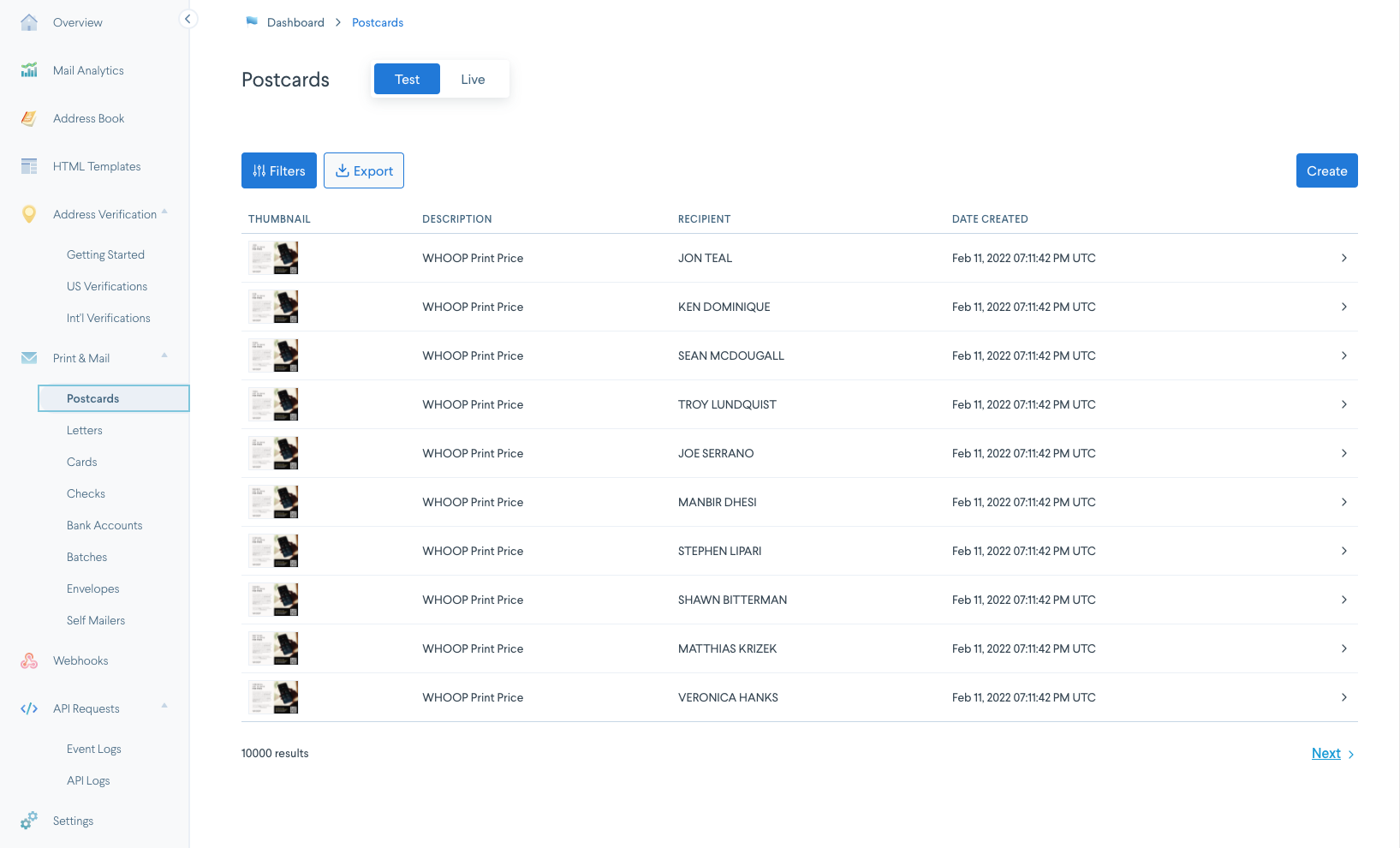 ## More resources ### Github For more comprehensive code examples for the different languages supported by Lob, **see the individual GitHub repositories for each language**: * [TypeScript](https://github.com/lob/lob-typescript-sdk) (see also, [Get started sending postcards with TypeScript](https://www.youtube.com/watch?v=norpZBsMHJE) video) * [Python](https://github.com/lob/lob-python) * [Ruby](https://github.com/lob/lob-ruby/) * [PHP](https://github.com/lob/lob-php/) * [Java](https://github.com/lob/lob-java) * [Elixir](https://github.com/lob/lob-elixir) * [C#/.NET](https://github.com/lob/lob-dotnet) ### Postman You can also [explore our APIs with Postman](postman-and-similar-tools).
--- description: Jump in and explore our APIs --- # API quickstart guide {% embed url="https://lob.wistia.com/medias/3rty603uh7" %} Overview of sending mail with Lob's APIs {% endembed %} **The following quickstart guide allows you to jump in and explore the** [**Lob Print & Mail API**](https://docs.lob.com) **in your preferred programming language.** ## Lob account basics In order to follow this Quickstart guide, you will need: * A Lob account; create your account [here](https://dashboard.lob.com/register). * Your [API keys](../account-management/api-keys) (you can find these in your Dashboard under Settings → API Keys) ## Language setup guides These brief sections are aimed at developers who are less familiar with the languages with which they will be working with Lob API. Currently, Lob provides client libraries in the following languages: \ (Note: If you are a TypeScript user, you can jump right in with a video tutorial: [Sending a postcard with Typescript](https://www.youtube.com/watch?v=norpZBsMHJE).) {% tabs %} {% tab title="TypeScript (NodeJS)" %} Follow the instructions on the [TypeScript download page](https://www.typescriptlang.org/download). For Windows, installing through the Visual Studio text editor is the best option. Follow the download and setup instructions on [the official Node.js website](https://nodejs.org/en/download/). To make switching between Node versions easy, install **nvm** on your local machine, following [the instructions](https://github.com/nvm-sh/nvm) in the official Node Version Manager GitHub repository. To get the latest LTS release, run: ```json // nvm install --lts ``` Alternatively, Windows users should install the [latest release](https://github.com/coreybutler/nvm-windows/releases) of nvm-windows by following [the instructions](https://github.com/coreybutler/nvm-windows) in its home repository. {% endtab %} {% tab title="Python" %} Download and set up the appropriate version from [Python’s official website](https://www.python.org/downloads/). {% endtab %} {% tab title="Ruby" %} #### Mac Run `ruby -v` to check whether it’s pre-installed. If not, run `brew install ruby` (make sure to [install Homebrew](https://brew.sh/) first if you haven’t already). Add the path for your version of Ruby to your environment’s `PATH` variable. #### Windows Download the appropriate version from [Ruby’s official downloads page](https://rubyinstaller.org/downloads/). {% endtab %} {% tab title="PHP" %} #### Mac Run`php -v`to check whether it’s pre-installed. If not, run`brew install php`(make sure to [install Homebrew](https://brew.sh/) first if you haven’t already). Add the path for your version of PHP to your environment’s **PATH** variable. [\ ](https://www.php.net/downloads.php) #### Windows Download the appropriate version from [PHP's official downloads page.](https://www.php.net/downloads.php) {% endtab %} {% tab title="Java" %} Download either the Arm 64 or x64 DMG Installer from [Java’s official downloads page](https://www.oracle.com/java/technologies/downloads/#jdk17-mac). {% endtab %} {% tab title="C#/.NET" %} Download from [Microsoft's official website](https://dotnet.microsoft.com/en-us/download). {% endtab %} {% endtabs %} ## Installing Lob’s API client This Quickstart guide provides a code example of one of Lob’s core services: creating a postcard through our Print & Mail API. **Make sure you are in the correct directory** before running the code samples (creating one for the purpose of running these is advised, but not required). Create a new directory and switch to it from your terminal app with these commands. `mkdir lob-qs` `cd lob-qs` The next step is to install the version of Lob API which matches the language you are working in: {% tabs %} {% tab title="Typescript" %} Install Lob's TypeScript SDK `npm install @lob/lob-typescript-sdk`\ {% endtab %} {% tab title="Python" %} Create a new virtual environment `python3 -m venv venv` Activate the environment `source venv/bin/activate` Install lob python from pypi `pip install lob_python` {% endtab %} {% tab title="Ruby" %} `gem install lob` {% endtab %} {% tab title="PHP" %} ```php curl -sS https://getcomposer.org/installer | php php composer.phar require lob/lob-php php composer.phar install ``` {% endtab %} {% tab title="Java" %} In this guide, we will be using [Maven](https://maven.apache.org/). From the command line, create a new maven project. ```java mvn archetype:generate -DgroupId=com.company.app -DartifactId=my-app -DarchetypeArtifactId=maven-archetype-quickstart -DarchetypeVersion=1.4 -DinteractiveMode=false ``` Edit the **pom.xml** file in the _my-app_ folder to include this bit of code: ```java com.lob lob-java 13.0.0 ... ``` In the **pom.xml** file update the source and target to 1.8 ```java 1.8 1.8 ``` {% endtab %} {% tab title="C#/.NET" %} Create a new C# project `dotnet new console` Install Lob's .NET SDK `dotnet add package lob.dotnet` {% endtab %} {% endtabs %} ## Creating a Postcard via API Now that a Lob API wrapper has been installed on your local machine, we can begin by sending a request to the API with the data necessary for postcard creation. Open the text editor of your choice (if you need to download one, we recommend Visual Studio Code) and paste the code in the language of your choice: (As a note, if the address in question has a suite or apartment number, you can add in a data point for it as such: -d "to\[address\_line2]=\") {% tabs %} {% tab title="TypeScript" %} In your working directory: * Create a new file _app.ts_ * Copy and paste the code below into _app.ts_ * Replace _\_ with your Lob Test API Key in the code. ```typescript import {Configuration, Postcard, PostcardsApi, PostcardEditable, AddressEditable } from "@lob/lob-typescript-sdk" async function demo() { const config: Configuration = new Configuration({ username: "" }) const postcardData : PostcardEditable = new PostcardEditable({ to: new AddressEditable({ name: "Harry Zhang", address_line1: "210 King Street", address_city: "San Francisco", address_state: "CA", address_zip: "94107" }), from: new AddressEditable({ name: "Leore Avidar", address_line1: "210 King Street", address_city: "San Francisco", address_state: "CA", address_zip: "94107" }), front: "https://s3-us-west-2.amazonaws.com/public.lob.com/assets/templates/4x6_pc_template.pdf", back: "https://s3-us-west-2.amazonaws.com/public.lob.com/assets/templates/4x6_pc_template.pdf" }) try { const result : Postcard = await new PostcardsApi(config).create(postcardData) return result } catch (err: any) { console.error(err) } } demo().then((result)=> console.log(result)).catch() ``` In your typescript project folder: Compile your code `tsc app.ts` \ Run your app: `node app.js` {% endtab %} {% tab title="Python" %} In your working directory: * Create a new file app.py * Copy and paste the code below into app.py * Replace _\_ with your Lob Test API Key in the code. ```python import lob_python from lob_python.exceptions import ApiException from lob_python.model.postcard_editable import PostcardEditable from lob_python.model.address_editable import AddressEditable from lob_python.model.merge_variables import MergeVariables from lob_python.model.country_extended import CountryExtended from lob_python.api.postcards_api import PostcardsApi configuration = lob_python.Configuration( username = "" ) postcard_editable = PostcardEditable( description = "First Postcard", front = "Front HTML for {{name}}", back = "Back HTML for {{name}}", to = AddressEditable( name = "Harry Zhang", address_line1 = "210 King Street", address_city = "San Francisco", address_state = "CA", address_zip = "94107", ), _from = AddressEditable( name = "Leore Avidar", address_line1 = "210 King Street", address_city = "San Francisco", address_state = "CA", address_zip = "94107", address_country = CountryExtended("US") ), merge_variables = MergeVariables( name = "Harry", ), ) with lob_python.ApiClient(configuration) as api_client: api = PostcardsApi(api_client) try: created_postcard = api.create(postcard_editable) print(created_postcard) except ApiException as e: print(e) ``` In your working directory: Run your app: `python app.py` {% endtab %} {% tab title="Ruby" %} In your working directory: * Create a new file _app.rb_ * Copy and paste the code below into _app.rb_ * Replace _\_ with your Lob Test API Key in the code. ```ruby require 'lob.rb' require 'pp' lob = Lob::Client.new(api_key: "") pp lob.postcards.create( description: "First Postcard", to: { name: "Harry Zhang", address_line1: "210 King Street", address_city: "San Francisco", address_state: "CA", address_zip: "94107" }, from: { name: "Leore Avidar", address_line1: "210 King Street", address_city: "San Francisco", address_state: "CA", address_zip: "94107" }, merge_variables: { name: "Harry" }, front: "Front HTML for {{name}}", back: "Back HTML for {{name}}" ) ``` In your working directory: Run your app: `ruby app.rb` {% endtab %} {% tab title="PHP" %} In your working directory: * Create a new file _app.php_ * Copy and paste the code below into _app.php_ * Replace _\_ with your Lob Test API Key in the code. ```php postcards()->create(array( "description" => "First Postcard", "to[name]" => "HARRY ZHANG", "to[address_line1]" => "210 KING STREET", "to[address_city]" => "SAN FRANCISCO", "to[address_state]" => "CA", "to[address_zip]" => "94107", "from[name]" => "LEORE AVIDAR", "from[address_line1]" => "210 KING STREET", "from[address_city]" => "SAN FRANCISCO", "from[address_state]" => "CA", "from[address_zip]" => "94107", "front" => "Front HTML for {{name}}", "back" => "Back HTML for {{name}}", "merge_variables[name]" => "Harry" )); print_r($postcard); ?> ``` In your working directory: Run your app: `php app.php` {% endtab %} {% tab title="Java" %} In your new maven project: * Locate the App.java file in main/java/com/company/app * Copy and paste the code below into A_pp.java_ * Replace _\_ with your Lob Test API Key in the code. ```java package com.company.app; import com.lob.api.ApiClient; import com.lob.api.ApiException; import com.lob.api.Configuration; import com.lob.api.auth.*; import com.lob.model.*; import com.lob.api.client.PostcardsApi; public class App { public static void main( String[] args ) { ApiClient lobClient = Configuration.getDefaultApiClient(); // Configure HTTP basic authorization: basicAuth HttpBasicAuth basicAuth = (HttpBasicAuth) lobClient.getAuthentication("basicAuth"); basicAuth.setUsername(""); PostcardsApi apiInstance = new PostcardsApi(lobClient); PostcardEditable postcardEditable = new PostcardEditable(); AddressEditable to = new AddressEditable(); to.setName("MORTICIA ADDAMS"); to.setAddressLine1("1313 CEMETERY LN"); to.setAddressCity("WESTFIELD"); to.setAddressState("NJ"); to.setAddressZip("07091"); AddressEditable to = new AddressEditable(); to.setName("MORTICIA ADDAMS"); to.setAddressLine1("1313 CEMETERY LN"); to.setAddressCity("WESTFIELD"); to.setAddressState("NJ"); to.setAddressZip("07091"); AddressEditable from = new AddressEditable(); from.setName("FESTER"); from.setAddressLine1("001 CEMETERY LN"); from.setAddressLine2("SUITE 666"); from.setAddressCity("WESTFIELD"); from.setAddressState("NJ"); from.setAddressZip("07091"); Gson gson = new Gson(); postcardEditable.setTo(gson.toJson(to)); postcardEditable.setFrom(gson.toJson(from)); postcardEditable.setFront("https://s3-us-west-2.amazonaws.com/public.lob.com/assets/templates/4x6_pc_template.pdf"); postcardEditable.setBack("https://s3-us-west-2.amazonaws.com/public.lob.com/assets/templates/4x6_pc_template.pdf"); try { Postcard result = apiInstance.create(postcardEditable); System.out.println(result); } catch (ApiException e) { System.err.println("Exception when calling PostcardsApi#postcardCreate"); System.err.println("Status code: " + e.getCode()); System.err.println("Reason: " + e.getResponseBody()); System.err.println("Response headers: " + e.getResponseHeaders()); e.printStackTrace(); } } } ``` In your maven project folder: Compile your code: `mvn clean install` Run your app: `mvn exec:java -Dexec.mainClass="com.company.app.App"` {% endtab %} {% tab title="C#/.NET" %} In your working directory: * In your working directory, you should have a file named _Program.cs_ from running the `dotnet new console` command. * Copy and paste the code below into _Program.cs_. * Replace _\_ with your Lob Test API Key in the code. ```csharp using System; using System.Collections.Generic; using System.Diagnostics; using lob.dotnet.Api; using lob.dotnet.Client; using lob.dotnet.Model; namespace test_dotnet { class Program { static void Main(string[] args) { Configuration config = new Configuration(); config.BasePath = "https://api.lob.com/v1"; // Configure HTTP basic authorization: basicAuth config.Username = ""; Dictionary mergeVariables = new Dictionary(); mergeVariables.Add("name", "Harry"); PostcardsApi apiInstance = new PostcardsApi(config); AddressEditable to = new AddressEditable( "210 King St", // addressLine1 null, // addressLine2 "San Francisco", // addressCity "CA", // addressState "94107", // addressZip CountryExtended.US, // addressCounty "First Postcard", // description "Harry Zhang" // name ); AddressEditable from = new AddressEditable( "210 King St", // addressLine1 null, // addressLine2 "San Francisco", // addressCity "CA", // addressState "94107", // addressZip CountryExtended.US, // addressCounty null, // description "Leore Avidar" // name ); PostcardEditable postcardEditable = new PostcardEditable( to.ToJson(), // to from.ToJson(), // from default(PostcardSize), // size "First Postcard", // description null, // metadata default(MailType), // mailType mergeVariables, // mergeVariables default(DateTime), // sendDate "Front HTML for {{name}}", // front "Back HTML for {{name}}" // back ); try { // create Postcard result = apiInstance.create(postcardEditable); Console.WriteLine(result.ToString()); } catch (ApiException e) { Console.WriteLine("Exception when calling PostcardsApi.create: " + e.Message ); Console.WriteLine("Status Code: "+ e.ErrorCode); Console.WriteLine(e.StackTrace); } } } } ``` In your working directory: Run your app: `dotnet run` {% endtab %} {% endtabs %} ## Data formatting To ensure your requests are processed efficiently and without error, it's crucial to submit data in the precise format outlined in our documentation. Adhering to these specifications guarantees the continued reliability and performance of our API services. **For fields that are intended to accept only string values, submitting JSON objects in string format (stringified JSON objects) is not supported.** Our system automatically parses and validates incoming data according to their expected types. As a result, providing a stringified JSON object in a field designated for string input can cause parsing errors or lead to unexpected validation results. ## Understanding the response This is a sample of the postcard object you will receive upon sending a creation request. Some information breakdowns: * As you can see, the `to` and `from` address objects have been expanded with more detail, including optional fields, creation and modification dates, and sanitized, verified address lines. * The postcard object also includes a signed URL to a digital copy of the created postcard, as well as thumbnails in three different sizes of the postcard’s front and back. * `front_template_id` and `back_template_id` are null in this particular object because we used inline HTML in the templates, rather than referencing a previously-saved HTML template. * Because we did not specify a size, the postcard is the default size of 4x6". * Both the `send_date` and the `expected_delivery_date` of the postcard are provided for transparency in the mailing process. {% embed url="https://gist.github.com/lobot/8a3f2ad22c9e38d2572105d0583954db#file-qs-response" %} To see the postcards you have created, log into your [Lob dashboard account](https://dashboard.lob.com/postcards) and navigate to the “Postcards” tab on the left-side navigation menu. You can toggle between the ones you have created using either your test or live key:  ## More resources ### Github For more comprehensive code examples for the different languages supported by Lob, **see the individual GitHub repositories for each language**: * [TypeScript](https://github.com/lob/lob-typescript-sdk) (see also, [Get started sending postcards with TypeScript](https://www.youtube.com/watch?v=norpZBsMHJE) video) * [Python](https://github.com/lob/lob-python) * [Ruby](https://github.com/lob/lob-ruby/) * [PHP](https://github.com/lob/lob-php/) * [Java](https://github.com/lob/lob-java) * [Elixir](https://github.com/lob/lob-elixir) * [C#/.NET](https://github.com/lob/lob-dotnet) ### Postman You can also [explore our APIs with Postman](postman-and-similar-tools).