Source Link: https://help.lob.com/print-and-mail/building-a-mail-strategy/choosing-a-delivery-strategy
# Choosing a delivery strategy Thinking through your **mail delivery strategy** can be a powerful differentiator in fostering meaningful connections, and should be a strategic pillar in building any direct mail program. Being adaptive in how you send and deliver mail given fast-changing customer preferences and market conditions can have an outsized impact on improving your reach, relevance, and responses. Lob’s automation technology offers different delivery options to deploy your direct mail campaigns with regards to speed, reach, and timing, so you can get in front of your target audience in a way that engages them the most. ## Immediate (or "ASAP") mailings As a default, Lob mail will be immediately sent and routed to production after the customer submits a mail order, pending any [cancellation rules](../managing-mail-settings#cancellation-windows-4) applied at the account or campaign level. This is the primary API setting for Lob mailings that is available to all customers, and optimizes for speed of delivery over delivery timing or reach. See [Tracking your mail](../getting-data-and-results/tracking-your-mail) on how to track individual mail pieces at each step of the production and delivery process, and see [webhooks](../getting-data-and-results/using-webhooks) on setting up and surfacing mail tracking notifications. ## Scheduled mailings for a future date {% hint style="info" %} Scheduled Mailings is available only to [Enterprise edition](https://dashboard.lob.com/#/settings/editions) customers. Contact [Sales](https://www.lob.com/sales) or your Account Manager to gain access to this feature. {% endhint %} Mailings can be scheduled up to 180 days in the future. Until that time, mailings can also be canceled. You can use this feature to * Create automated drip campaigns (e.g. send a postcard at 15, 30, and 60 days) * Schedule recurring sends * Plan your mailing schedule ahead of time Up until the time a mailing is scheduled for, it can also be canceled. If you use this feature in conjunction with a cancellation window, the `send_date` parameter will always take precedence. Example: Create request using `send_date` ```json curl https://api.lob.com/v1/postcards \ -u test_0dc8d51e0acffcb1880e0f19c79b2f5b0cc: \ -d "description=Demo Future Postcard" \ -d "to=adr_bae820679f3f536b" \ -d "from=adr_210a8d4b0b76d77b" \ -d "front=tmpl_b846a20859ae11a" \ -d "back=tmpl_01b0d396a10c268" \ -d "merge_variables[name]=Harry" \ -d "send_date=2021-07-26" ``` ### Scheduling a future mailing Scheduling a mailing for the future just requires one additional parameter: `send_date`. This specifies a date and time up to 180 days in the future to start processing the mailing. For billing purposes, requests will count towards the month of their `send_date`, and will not be charged if they are canceled before that time. If your account has a [cancellation window](../managing-mail-settings#cancellation-windows-4) set for the resource you are creating, passing a `send_date` will override that window. For more detailed request information, see our [API documentation](https://docs.lob.com/#operation/postcard_create). ### Canceling a future mailing If something changes on your side and you no longer wish to send a mailing that had already been scheduled (such as the customer taking a certain action), you can programmatically [cancel those requests](https://docs.lob.com/#operation/postcard_delete) as long as the mailing's `send_date` has not passed. Additionally, you can cancel a mailing from your [dashboard](https://dashboard.lob.com/) on the page associated with your mail piece. 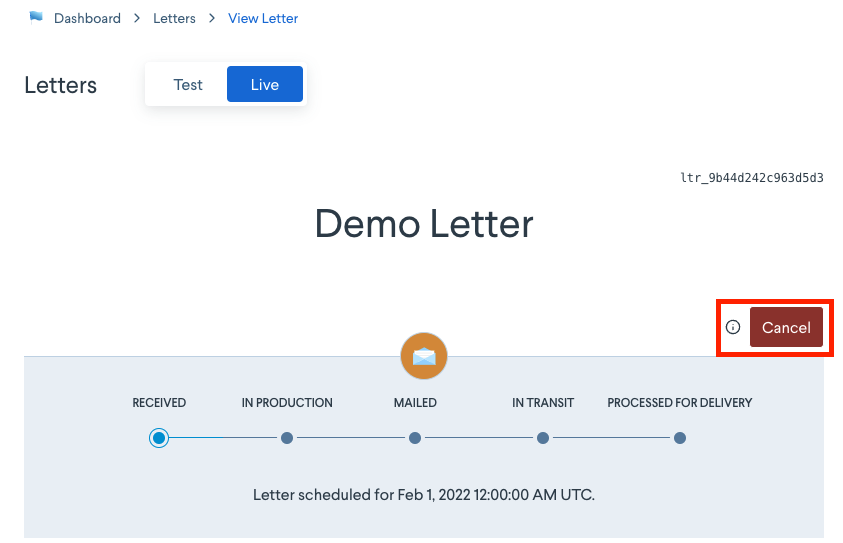 ## Target delivery date {% hint style="info" %} Target Delivery is under development; contact [Sales](https://www.lob.com/sales) or your Account Manager to explore this functionality. {% endhint %} Lob prides itself on speed of execution: our goal is to get mail into the USPS mailstream within 2 business days from submission. However, we’ve heard from customers that more exact timing of delivery is of equal importance. We are currently developing a new feature for timing mail arrival in the end-recipient’s mailbox. Our goal with Target Delivery will be for 80% of campaign mail pieces to land in the recipient’s mailbox on or within 3 business days before or after the specified in-home target date. With a target release date in 2024, this feature will be available to Enterprise edition customers and prospects who can meet the requirements of volume and saturation.
# Choosing a delivery strategy Thinking through your **mail delivery strategy** can be a powerful differentiator in fostering meaningful connections, and should be a strategic pillar in building any direct mail program. Being adaptive in how you send and deliver mail given fast-changing customer preferences and market conditions can have an outsized impact on improving your reach, relevance, and responses. Lob’s automation technology offers different delivery options to deploy your direct mail campaigns with regards to speed, reach, and timing, so you can get in front of your target audience in a way that engages them the most. ## Immediate (or "ASAP") mailings As a default, Lob mail will be immediately sent and routed to production after the customer submits a mail order, pending any [cancellation rules](../managing-mail-settings#cancellation-windows-4) applied at the account or campaign level. This is the primary API setting for Lob mailings that is available to all customers, and optimizes for speed of delivery over delivery timing or reach. See [Tracking your mail](../getting-data-and-results/tracking-your-mail) on how to track individual mail pieces at each step of the production and delivery process, and see [webhooks](../getting-data-and-results/using-webhooks) on setting up and surfacing mail tracking notifications. ## Scheduled mailings for a future date {% hint style="info" %} Scheduled Mailings is available only to [Enterprise edition](https://dashboard.lob.com/#/settings/editions) customers. Contact [Sales](https://www.lob.com/sales) or your Account Manager to gain access to this feature. {% endhint %} Mailings can be scheduled up to 180 days in the future. Until that time, mailings can also be canceled. You can use this feature to * Create automated drip campaigns (e.g. send a postcard at 15, 30, and 60 days) * Schedule recurring sends * Plan your mailing schedule ahead of time Up until the time a mailing is scheduled for, it can also be canceled. If you use this feature in conjunction with a cancellation window, the `send_date` parameter will always take precedence. Example: Create request using `send_date` ```json curl https://api.lob.com/v1/postcards \ -u test_0dc8d51e0acffcb1880e0f19c79b2f5b0cc: \ -d "description=Demo Future Postcard" \ -d "to=adr_bae820679f3f536b" \ -d "from=adr_210a8d4b0b76d77b" \ -d "front=tmpl_b846a20859ae11a" \ -d "back=tmpl_01b0d396a10c268" \ -d "merge_variables[name]=Harry" \ -d "send_date=2021-07-26" ``` ### Scheduling a future mailing Scheduling a mailing for the future just requires one additional parameter: `send_date`. This specifies a date and time up to 180 days in the future to start processing the mailing. For billing purposes, requests will count towards the month of their `send_date`, and will not be charged if they are canceled before that time. If your account has a [cancellation window](../managing-mail-settings#cancellation-windows-4) set for the resource you are creating, passing a `send_date` will override that window. For more detailed request information, see our [API documentation](https://docs.lob.com/#operation/postcard_create). ### Canceling a future mailing If something changes on your side and you no longer wish to send a mailing that had already been scheduled (such as the customer taking a certain action), you can programmatically [cancel those requests](https://docs.lob.com/#operation/postcard_delete) as long as the mailing's `send_date` has not passed. Additionally, you can cancel a mailing from your [dashboard](https://dashboard.lob.com/) on the page associated with your mail piece.  ## Target delivery date {% hint style="info" %} Target Delivery is under development; contact [Sales](https://www.lob.com/sales) or your Account Manager to explore this functionality. {% endhint %} Lob prides itself on speed of execution: our goal is to get mail into the USPS mailstream within 2 business days from submission. However, we’ve heard from customers that more exact timing of delivery is of equal importance. We are currently developing a new feature for timing mail arrival in the end-recipient’s mailbox. Our goal with Target Delivery will be for 80% of campaign mail pieces to land in the recipient’s mailbox on or within 3 business days before or after the specified in-home target date. With a target release date in 2024, this feature will be available to Enterprise edition customers and prospects who can meet the requirements of volume and saturation.