Source Link: https://help.lob.com/print-and-mail/building-a-mail-strategy/managing-mail-settings/using-metadata
# Using metadata ## Metadata tags In the Lob ecosystem, metadata is used to “tag” each mail piece or each campaign. You can use metadata to find individual mail pieces more easily and group mail pieces together for reporting and attribution. Example metadata tags could include a campaign name, a customer segment, or an internal ID. Using metadata smartly can help bridge the gap between Lob and your internal systems, allow you track mail at a more granular level, and create data-driven stories to get the most ROI out of the direct mail channel. See [here for more coding examples using metadata tags](https://help.lob.com/developer-docs/use-case-guides/mass-deletion-setup#use-lob-metadata). ### Metadata types There are several kinds of metadata at Lob: * **Mailpiece metadata** can be used on our single mailpiece APIs. * **Campaign metadata** can be used with our Campaigns feature, and allow you to filter your searches by all mailpieces in a particular campaign. * **Recipient metadata** can be used within our Campaign UI feature in the dashboard, and allow you to filter by a specific subset of mailpieces. ### Key-value pairs Both mailpiece and campaign metadata rely on **key-value pairs** that you create. * The **key**, or **tag name**, is what will remain consistent across all the mailpieces you’d like to create. For example, “state”. * The **value**, or **tag value**, will be unique to each mailpiece, for example “NC” or “CA”. * When combined, you can easily find mailpieces with “`state:NC`” or “`state:CA`”. Metadata objects can include up to 20 key-value pairs of custom data. Each metadata key must be less than 40 characters long and values must be less than 500 characters. Neither can contain the characters `"` and `\`. Metadata does not support nested objects. ## Mailpiece metadata Mailpiece metadata applies to each individual mailpiece sent. Mailpiece metadata is great for tags that are specific to each recipient, like `state:NC` or `first_name:John`. You can create mailpiece metadata on our single mailpiece APIs by including a metadata object with each mailpiece `POST` request. Here is an example of a mailpiece `POST` request to our `api.lob.com/v1/postcards` endpoint, including a metadata object: ```json { "description": "demo", "to": "adr_210a8d4b0b76d77b", "from": "adr_210a8d4b0b76d77b", "front": "tmpl_a1234dddg", "back": "tmpl_a1234dddg", "size": "6x9", "mail_type": "usps_first_class", "metadata": { "spiffy": "true", "first_name": "John", "state": "NC", "segment": "012b-ACQ" }, "send_date": "2022-01-01T00:00:00.000Z" } ``` ## Campaign metadata Metadata at the campaign level is configured on the `POST /v1/campaigns` [API call](https://docs.lob.com/#tag/Campaigns) or in the dashboard, in the Campaigns [Configure Settings](https://dashboard.lob.com/campaigns/create/settings) screen at the bottom “Add Tags” section. {% hint style="warning" %} Campaign metadata **cannot be configured within your campaign CSV** {% endhint %} Each individual mailpiece created through the campaign will inherit Campaign metadata. This is great for tags you’d like to apply to an entire campaign. ### Recipient metadata In addition to Campaign metadata, you can assign metadata on the individual recipient level. This is great for instances in which you'd like to apply context specific to each individual such as a unique identifier, customer id, or email address. ## Filtering your metadata In the dashboard, you can filter metadata at the single mailpiece level. Any mailpiece created in the Campaigns function will also be visible within the single mail piece tabs. Example: In the [Postcards](https://dashboard.lob.com/postcards) section, click on ‘Filters’ and search by Metadata 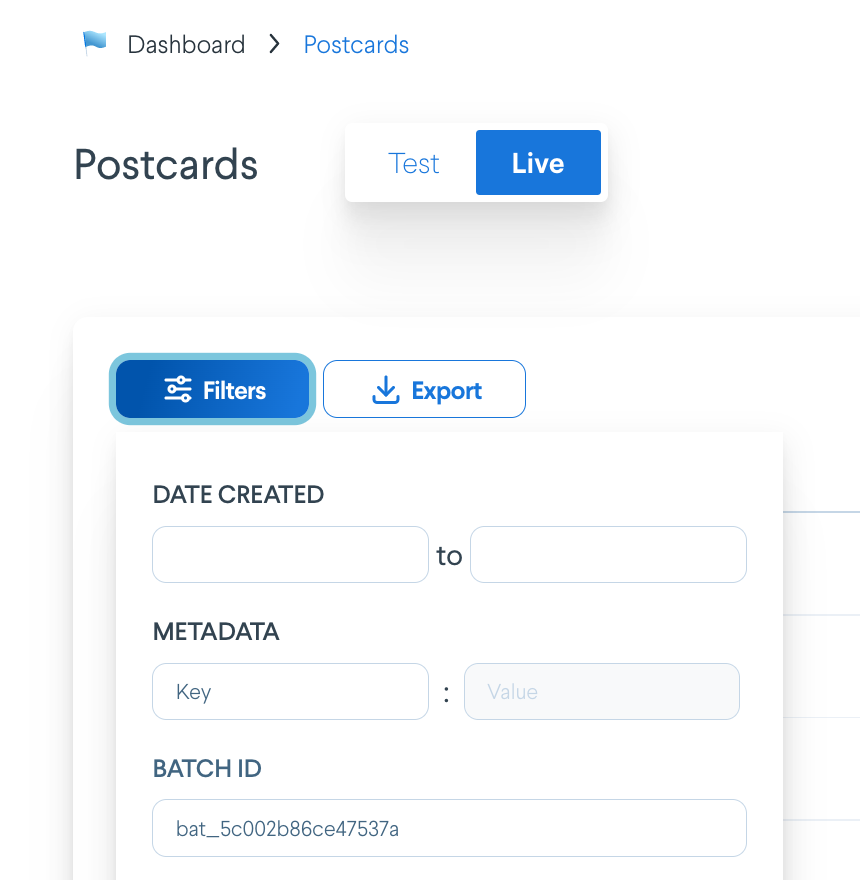 \ You can also go into any individual mailpiece, and see the key-value pairs tagged in the 'Metadata' section under the 'Details' section. 
# Using metadata ## Metadata tags In the Lob ecosystem, metadata is used to “tag” each mail piece or each campaign. You can use metadata to find individual mail pieces more easily and group mail pieces together for reporting and attribution. Example metadata tags could include a campaign name, a customer segment, or an internal ID. Using metadata smartly can help bridge the gap between Lob and your internal systems, allow you track mail at a more granular level, and create data-driven stories to get the most ROI out of the direct mail channel. See [here for more coding examples using metadata tags](https://help.lob.com/developer-docs/use-case-guides/mass-deletion-setup#use-lob-metadata). ### Metadata types There are several kinds of metadata at Lob: * **Mailpiece metadata** can be used on our single mailpiece APIs. * **Campaign metadata** can be used with our Campaigns feature, and allow you to filter your searches by all mailpieces in a particular campaign. * **Recipient metadata** can be used within our Campaign UI feature in the dashboard, and allow you to filter by a specific subset of mailpieces. ### Key-value pairs Both mailpiece and campaign metadata rely on **key-value pairs** that you create. * The **key**, or **tag name**, is what will remain consistent across all the mailpieces you’d like to create. For example, “state”. * The **value**, or **tag value**, will be unique to each mailpiece, for example “NC” or “CA”. * When combined, you can easily find mailpieces with “`state:NC`” or “`state:CA`”. Metadata objects can include up to 20 key-value pairs of custom data. Each metadata key must be less than 40 characters long and values must be less than 500 characters. Neither can contain the characters `"` and `\`. Metadata does not support nested objects. ## Mailpiece metadata Mailpiece metadata applies to each individual mailpiece sent. Mailpiece metadata is great for tags that are specific to each recipient, like `state:NC` or `first_name:John`. You can create mailpiece metadata on our single mailpiece APIs by including a metadata object with each mailpiece `POST` request. Here is an example of a mailpiece `POST` request to our `api.lob.com/v1/postcards` endpoint, including a metadata object: ```json { "description": "demo", "to": "adr_210a8d4b0b76d77b", "from": "adr_210a8d4b0b76d77b", "front": "tmpl_a1234dddg", "back": "tmpl_a1234dddg", "size": "6x9", "mail_type": "usps_first_class", "metadata": { "spiffy": "true", "first_name": "John", "state": "NC", "segment": "012b-ACQ" }, "send_date": "2022-01-01T00:00:00.000Z" } ``` ## Campaign metadata Metadata at the campaign level is configured on the `POST /v1/campaigns` [API call](https://docs.lob.com/#tag/Campaigns) or in the dashboard, in the Campaigns [Configure Settings](https://dashboard.lob.com/campaigns/create/settings) screen at the bottom “Add Tags” section. {% hint style="warning" %} Campaign metadata **cannot be configured within your campaign CSV** {% endhint %} Each individual mailpiece created through the campaign will inherit Campaign metadata. This is great for tags you’d like to apply to an entire campaign. ### Recipient metadata In addition to Campaign metadata, you can assign metadata on the individual recipient level. This is great for instances in which you'd like to apply context specific to each individual such as a unique identifier, customer id, or email address. ## Filtering your metadata In the dashboard, you can filter metadata at the single mailpiece level. Any mailpiece created in the Campaigns function will also be visible within the single mail piece tabs. Example: In the [Postcards](https://dashboard.lob.com/postcards) section, click on ‘Filters’ and search by Metadata  \ You can also go into any individual mailpiece, and see the key-value pairs tagged in the 'Metadata' section under the 'Details' section. 